
Apple HomeView | Price, Features, Siri AI and Release Date
Apple HomeView is a $299, seven-inch smart display that brings Siri AI, smart-home controls, FaceTime and music into one screen. It goes on sale November 13, 2026. Here’s what it does, what to check first, and who it’s really for.
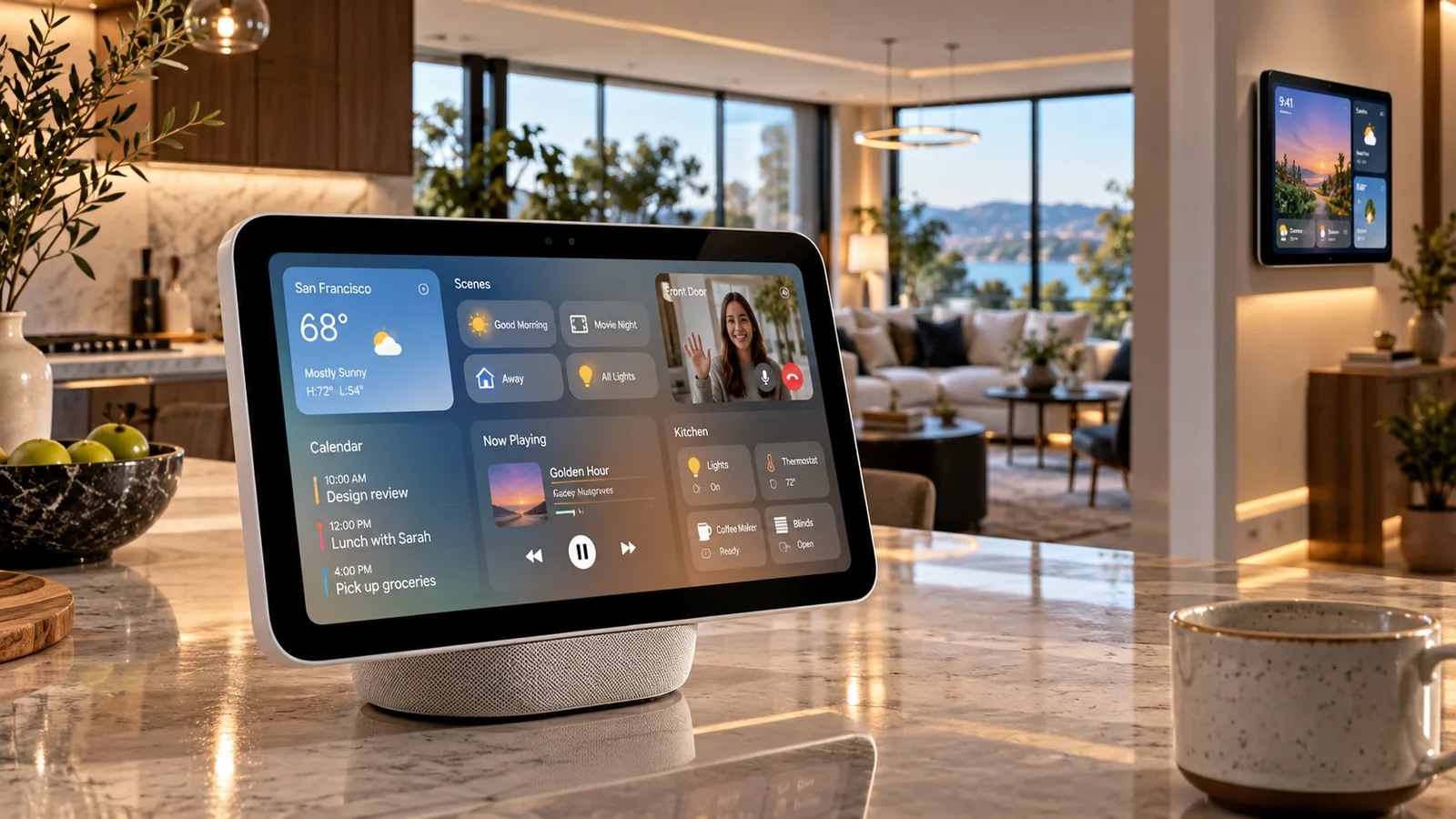
Apple just announced a smart display for the home, and it’s called HomeView. It was unveiled on October 13, 2026, and it starts at $299 in the US. It goes on sale Friday, November 13, and pre-orders are already open.
Is it simply Siri on a screen? Not quite. Apple wants this to be a shared household device that knows who’s standing in front of it and adjusts accordingly. Here’s what Apple has confirmed so far, plus a few details worth checking before you spend money.
So, what is it?
HomeView is a seven-inch smart display built around three jobs: running your connected home, keeping you in touch with people, and keeping you entertained.
You know those moments when you grab your phone for something tiny? Checking the weather before you head out, nudging the thermostat, killing the lights, seeing who’s at the door. HomeView is meant to take over those little tasks from a screen that just lives in your house.
It comes in two versions, a tabletop model with a speaker base and a separate wall-mounted one. Both run Apple’s new Siri AI experience, and the display can show household controls, reminders, calendar details and compatible camera views.
The part I find most interesting is personalization. Rather than showing everyone the same thing, HomeView can recognize different people in the household and change what appears on screen. For a shared device, that’s a smart idea. Whether it feels convenient day to day is something we’ll only learn once people have lived with it.
Price and release date.
The tabletop and wall-mounted versions share the same $299 starting price. But there’s a catch: the wall-mounted model needs mounting hardware, sold separately. Apple offers compatible mounting options developed with Schneider Home, so depending on your setup, you could end up paying more than $299.
Apple has announced availability in the United States, United Kingdom, Canada, Australia, New Zealand, India, Singapore and South Africa. Prices vary by country, so if you’re outside the US, check your local Apple store instead of converting dollars in your head.
The European Union is a different story. HomeView won’t initially be sold there, because Siri AI isn’t currently available in the EU under the same conditions. Apple hasn’t given an EU release date.
Design.
This doesn’t look like a tablet propped on a stand. On the tabletop model, the seven-inch Liquid Retina display connects to a rounded speaker base through a stainless-steel hinge, and the screen tilts. That should make it easy to see whether you’re at the kitchen counter or sitting next to a desk. You can get it in silver, starlight, rose pink or space gray.
The wall-mounted model comes in silver and space gray and is aimed at spots like hallways and entryways.
Picking between them matters more than you’d think. A tabletop display suits music, calls, timers and glanceable info. The wall version makes more sense if what you really want is a central control panel for the house. And don’t assume you can buy the tabletop now and turn it into the wall version later, because they’re separate pieces of hardware. If you lean toward the wall model, look into the extra mounting and power requirements first.
How Siri AI works on HomeView.
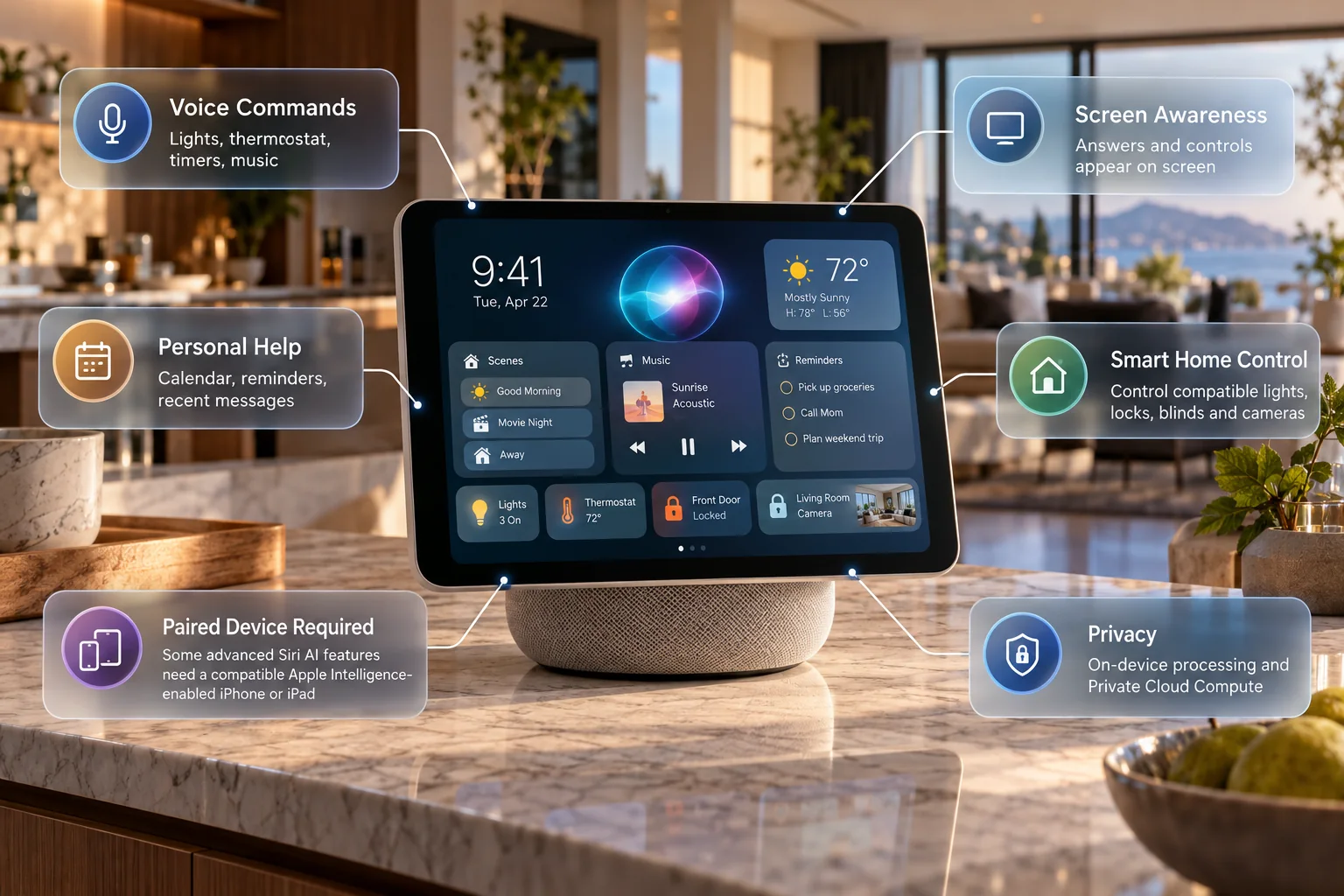
Siri AI is the headline feature. Apple describes it as a more conversational assistant with broader knowledge, awareness of what’s on the screen, and the ability to help with everyday activities.
It helps to separate two things, though: what Siri AI does on HomeView by itself, and what opens up when HomeView is paired with a compatible Apple Intelligence-enabled device.
The everyday stuff.
For routine tasks, you can just ask. Turn off the lights downstairs, adjust the thermostat, start music while you cook, set a timer, check a reminder, or ask a question and see the answer on screen. A short voice command beats unlocking your phone, opening an app and hunting for the right control.
The personal stuff.
This is where it gets more ambitious. Apple says that when HomeView is paired with a compatible Apple Intelligence-enabled device, Siri AI can pull from supported apps, including Messages, Calendar and Reminders, to give more personalized help. You could ask about an upcoming appointment or something from a recent conversation, and the assistant is designed to use that context instead of treating each question as a fresh start.
But don’t confuse these features with basic smart-home commands. Some of the personalized Siri AI features need a compatible Apple Intelligence-enabled iPhone or iPad. If those are the features you’re buying for, check that your existing devices qualify before ordering.
And a reminder that Apple’s announcement tells us what the system is designed to do. It doesn’t tell us how reliably it will do it in a real house with real people talking over each other.
It recognizes family members.
Anyone who has shared a smart display knows the problem: everybody wants different information. One person wants work reminders, another wants their calendar, their music or their messages.
Apple’s answer is facial recognition. HomeView can identify up to six household users and adapt its interface to whoever is using it. That could make a kitchen or living-room display far more practical than one tied to a single account.
It also raises fair privacy questions. Everyone in the home should understand what the device can show, how personalization gets set up, and which permissions protect private content. Convenience is nice, but you should be comfortable with a shared screen reaching into personal information.
Smart-home features.
HomeView is meant to make connected-home controls easier to find. Compatible devices work through Apple’s Home experience, including smart lights, thermostats, blinds, locks and cameras. You could check whether the front door is locked, change the lighting in a room, or pull up a supported camera feed.
Apple also announced new smart-home accessories made with partners including LG Electronics and Schneider Electric. They’re part of the bigger connected-home plan, but they may have their own prices, requirements and release schedules.
Will it work with every smart device you own? Probably not. A Wi-Fi gadget isn’t automatically compatible. It depends on the accessory, the smart-home standards it supports, the Apple Home ecosystem, and sometimes extra hardware or software. If you’ve already spent money on lights, security gear or thermostats, check each product before buying the display. The same goes if you’re coming from another ecosystem, because a new screen won’t help if it can’t control what you already have.
Music, podcasts and FaceTime.
HomeView does more than flip switches. The tabletop model has a speaker base, and the display supports Apple Music and Apple Podcasts. There’s also FaceTime with Center Stage, which is meant to make video calls easier from a fixed spot.
Picture a video call with family while you move around the kitchen, with no phone to hold. None of this is new on its own, but putting it all in one dedicated device could make it more convenient. Whether the audio quality and calling experience justify the price is something independent reviewers will have to test after launch.
Privacy and security.
Apple puts privacy front and center here. The company says HomeView uses on-device processing for supported tasks and Private Cloud Compute for certain more demanding requests. Apple also states that information processed through Private Cloud Compute isn’t stored or made accessible to Apple.
That matters, since the device can touch household controls and potentially sensitive personal information. Still, no connected device is completely risk-free. Before you switch on personalized features, review account access, household permissions, software updates, and what can show up on the shared display. Apple’s approach may appeal to existing customers, but the security and reliability of the whole experience deserve independent scrutiny.
Is it worth $299?
That depends less on the feature list and more on how you live in your home.
HomeView looks like a good fit if your household already uses Apple devices, has compatible smart-home accessories, and would get real use out of a central display. It also makes sense if you use FaceTime, Apple’s entertainment services or shared calendars a lot.
But $299 is real money for something that doesn’t replace your phone, tablet or computer. If all you want is to play music or occasionally control a light, this may be more device than you need. And if you’re eyeing the wall-mounted model, add the mounting hardware to your budget.
Before ordering, ask yourself three things:
Will I really use a shared display?
Do my current devices work with it?
Does it still make sense once I add up the full cost?
For now, HomeView looks most appealing to households already comfortable in Apple’s ecosystem. A real verdict will have to wait until it’s been tested in ordinary homes.
Mistakes to avoid before you buy.
Launches are exciting, and it’s easy to miss the practical stuff. A few traps:
Assuming every Siri AI feature works the same on every Apple device. Some advanced features have extra requirements.
Looking only at the $299 sticker and forgetting mounting accessories or the cost of compatible smart-home gear.
Believing every connected device will work with Apple Home.
Treating an announcement as a review. Early impressions help, but long-term performance, software reliability and day-to-day convenience take time to judge.
FAQ
How much does Apple HomeView cost?
It starts at $299 in the United States. Tabletop and wall-mounted versions cost the same to start, though wall-mounting hardware is extra.
When does it come out?
Apple announced on October 13, 2026 that HomeView is scheduled to be available on November 13, 2026, in supported launch markets.
What is it used for?
It combines compatible smart-home controls, Siri AI assistance, music, FaceTime, personal information and other household features on a seven-inch display.
Does it need an iPhone?
Some basic functions run on the device itself, but advanced personalized Siri AI features require pairing with a compatible Apple Intelligence-enabled device. Check Apple’s requirements before you buy.
Can it control smart lights and locks?
Yes, it’s designed to manage compatible accessories through Apple’s Home ecosystem. Compatibility varies by device and setup.
Does it have facial recognition?
Apple says HomeView can recognize up to six users and personalize the experience for whoever is using the display.
Is it available in Europe?
It isn’t scheduled for initial sale in the European Union, and Apple hasn’t said when that might change.
Is it better than an iPad?
They do different jobs. An iPad is a portable, general-purpose tablet. HomeView is a shared household display focused on smart-home control, entertainment and personal assistance.
Final thoughts.
HomeView is an interesting step in how Apple thinks about the connected home. The seven-inch display, the $299 starting price, the shared-user personalization and Siri AI give it a clear purpose beyond being yet another screen.
For families already using Apple’s services and compatible smart-home gear, having one spot for household controls and everyday information is appealing. The open questions are compatibility, how reliable the personalized AI turns out to be, and whether the whole thing is useful enough to justify the cost.
With the November 13, 2026 release date coming up, we’ll know a lot more once HomeView reaches customers and independent testing picks up.
Want more plain-English takes on new tech? Check out the latest technology coverage on Sponsored Post Hub.
Reader Reaction
Was this article useful?
1 reader likes this article.
Share This Article
Found this story useful? Share it with your network.
Comments
0 discussionsAdd your perspective, reply to other readers, and keep the conversation useful.
Conversation
Reader responses