
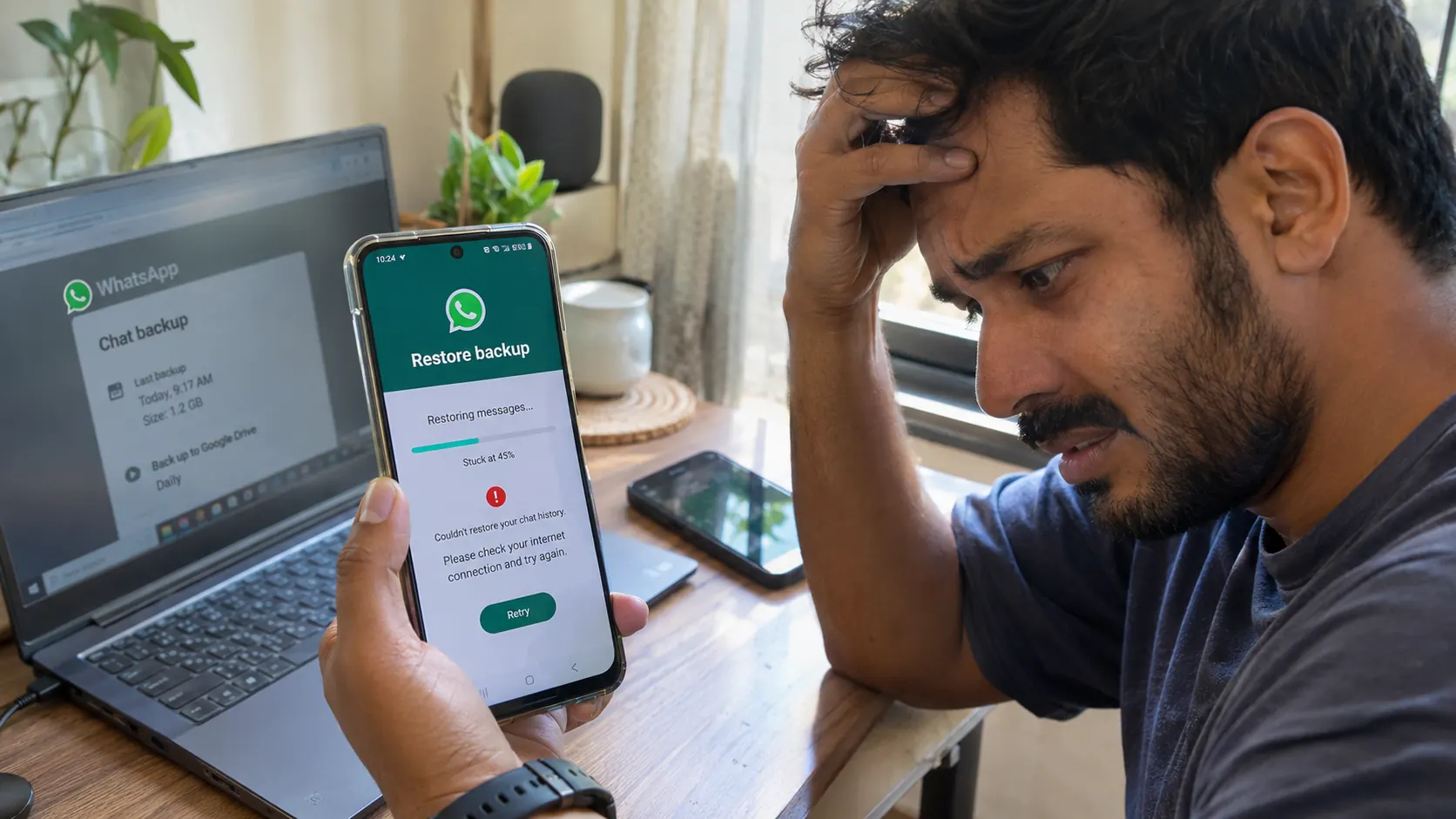
New phone day usually goes smoothly until the restore screen appears. You installed WhatsApp and entered your number. Then WhatsApp claims it can’t find a backup.
Or the progress bar sits frozen for an hour. Or the restore finishes and a handful of conversations have vanished.
Losing years of messages and photos is the real fear here. Reinstalling an app is nothing by comparison.
Which fix works depends on where the backup was saved. The phone you use matters too along with the exact error on screen. Protect whatever chat history you still have before touching anything.
The short answer
Restore failures usually trace back to a handful of causes. A wrong Google or Apple Account is one. A phone number that differs from the original is another. Low storage can do it and so can a shaky internet connection. Encrypted backups ask for a password or a key while some setups use a supported passkey instead. Sometimes the backup itself is incomplete or damaged.
Start by confirming that a usable backup exists. Then check that you are using the original WhatsApp phone number along with the correct Google Account on Android or Apple Account on iPhone. Phone storage and cloud storage come next. A steady WiFi connection and a charged phone follow after that. If encryption is switched on you need a way to unlock it.
Uninstalling WhatsApp or deleting an existing backup too early can backfire since you may not yet know where your recoverable chats sit. A reset makes things worse when the original phone holds the only remaining copy.
Your old phone is the safety net
An old phone that still opens WhatsApp and shows your conversations is your best asset. Leave it intact. Clearing WhatsApp’s app data would wreck it. A factory reset would too. Removing the Google or Apple Account can disrupt backup access, but it does not automatically erase locally stored chats.
Creating a fresh backup from an empty or incomplete chat history carries its own risk. WhatsApp says newer backups on Android can overwrite earlier Google Account backups tied to the same account and number. An older backup holding conversations you never restored could vanish that way.
While the old phone still works you can open Settings > Chats > Chat backup and jot down the last successful backup date. The account and backup settings shown there are worth writing down as well.
WhatsApp’s backup screen creates and manages backups. A general button for restoring an old cloud backup into an account that is already set up does not exist there. Cloud restoration normally gets offered during first time setup. Reinstalling might become necessary later on once you have confirmed that a recoverable backup exists.
Which backup are we even talking about?
WhatsApp uses different cloud systems depending on the phone. Android relies on a Google Account while iPhone relies on iCloud. Either way the original account is required along with a phone number that matches the backup. Storage on the phone matters as well as storage in Google or iCloud. Encrypted backups on both platforms need a password or a key. A supported passkey works too.
| What to check | Android | iPhone |
|---|---|---|
| Cloud backup | Google Account | iCloud |
| Account used for restore | Matching Google Account | Matching Apple Account |
| WhatsApp phone number | Same number as the backup | Same number as the backup |
| Storage to check | Phone and Google storage | iPhone and iCloud storage |
| Encrypted backup | Required unlock credential | Required unlock credential |
| Moving between platforms | Supported migration needed | Supported migration needed |
An iCloud backup cannot go through Android’s Google backup process. An Android Google Account backup will never appear on the normal iPhone iCloud restore screen. Moving between Android and iPhone calls for a supported migration method since the two systems don’t share backups.
Android fixes in order
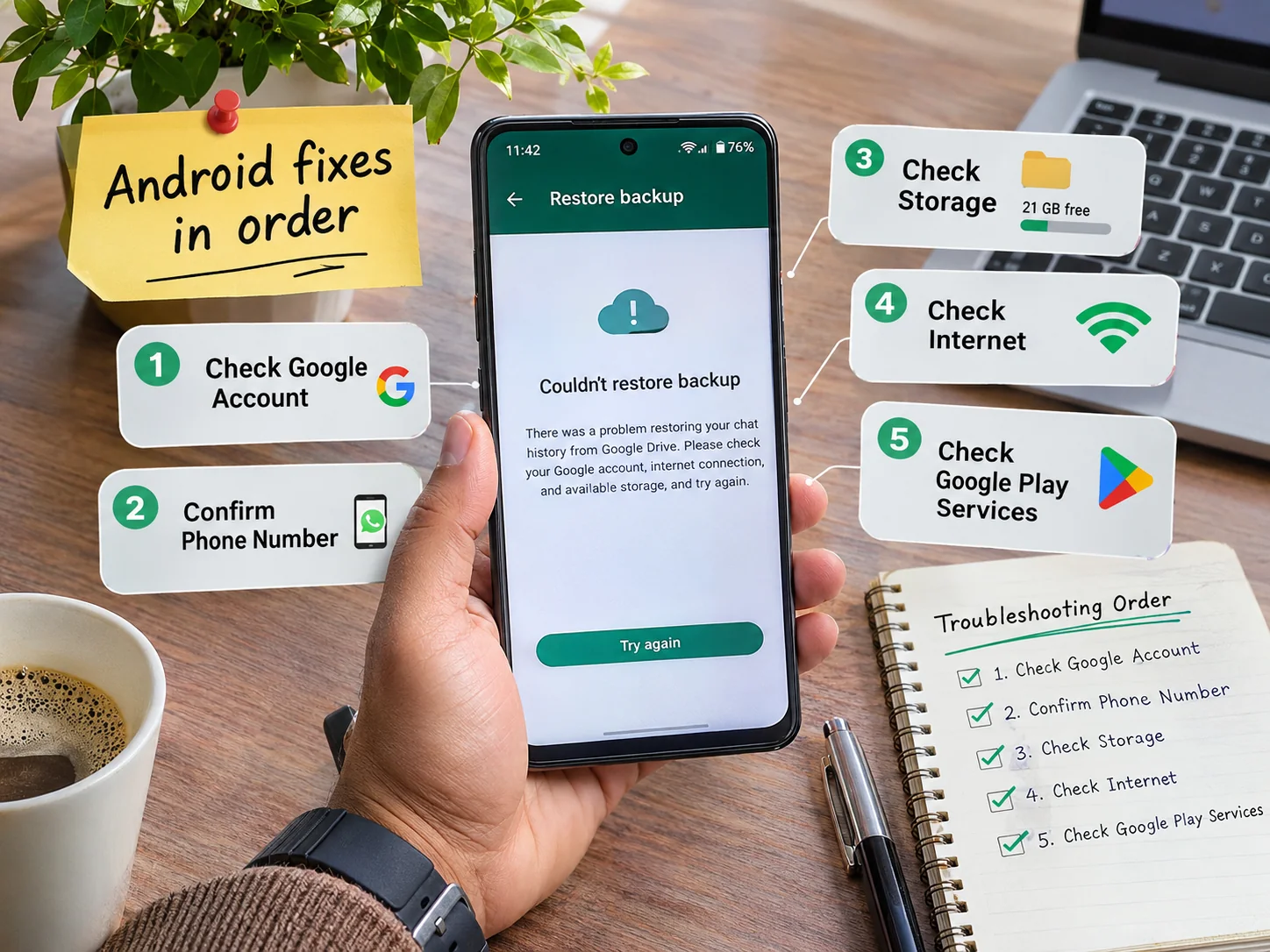
Check the Google Account
A backup can exist under an account your phone isn’t currently using. Open Android Settings and look at which Google Accounts are signed in. Anyone juggling several Gmail addresses has to work out which one WhatsApp backups originally used. The old phone can settle it if WhatsApp still runs there since Settings > Chats > Chat backup shows the associated account. Backups are tied to the phone number and the Google Account used when they were created. Signing into a different Google Account won’t reveal that backup. WhatsApp’s official Google Account backup guidance covers the specific requirements.
Verify the original WhatsApp number
The phone number comes next. You have to verify the same number that created the backup. A different SIM card doesn’t necessarily matter as long as you can verify the correct WhatsApp number. Changing your WhatsApp number without properly migrating the account can interfere with recovery though. Permanent number changes call for WhatsApp’s official Change Number process on the old device where possible. A new number won’t unlock a backup that belongs to the old one.
Check Google and phone storage
Google Account storage is a shared pool. Gmail draws from it and so does Google Drive. Google Photos and Android WhatsApp backups share it as well. A full pool can make backup creation fail. Low space on the phone itself can interfere with restoring files. Google One or your Google Account storage settings show what is left while the phone’s internal storage deserves a look too. Clear unneeded downloads only after checking they aren’t the sole copy of something important. Deleting your existing WhatsApp cloud backup to free space is off the table while you recover. Google warns that such deletion is permanent. Google’s official storage management guide explains the difference between cleaning up storage and deleting a backup.
Check Wi-Fi and power
Years of media make for a large backup so restoring takes time. WiFi is the better choice with the phone plugged into power. A stalled restore might simply mean the WiFi has stopped working. WhatsApp suggests restarting the device or trying another network when backups stay stuck. Hopping between networks mid restore can cause timeouts according to WhatsApp.
Review Google Play Services and permissions
On supported Android devices Google Play Services helps WhatsApp talk to Google Account features. Account access errors or permission errors point toward Google Play Services updates and WhatsApp’s permissions. Official WhatsApp and Google settings are the place to sort that out. Third party recovery apps that promise to unlock backups are another matter entirely. WhatsApp’s Android backup troubleshooting instructions list error specific steps and some involve advanced account work. Removing accounts at random is a bad way to go about it.
On an iPhone
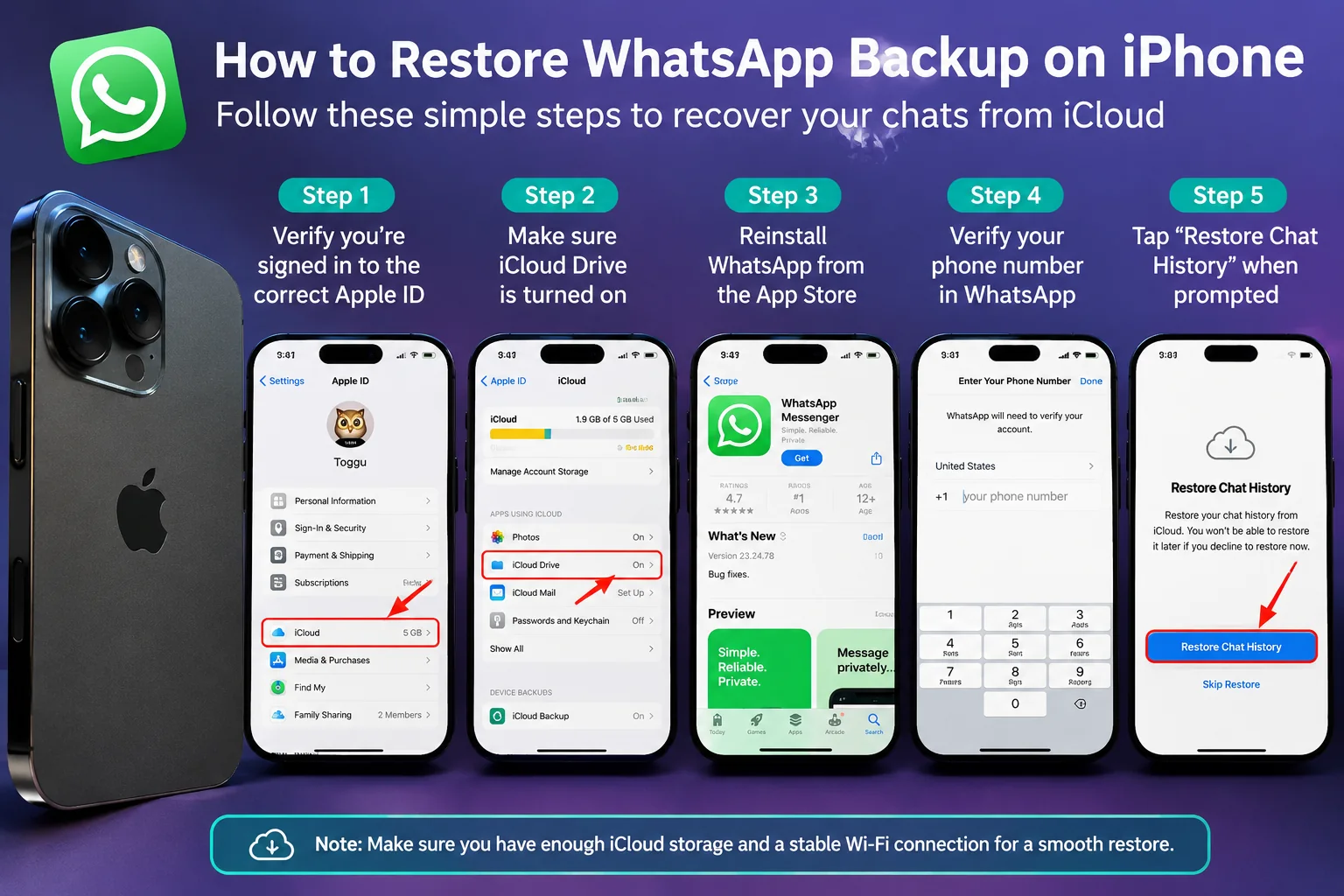
Confirm the Apple Account
iPhones normally pull chat history from an existing iCloud backup. The first thing to find out is whether that backup sits under the Apple Account signed in right now. Settings > [your name] shows which one it is. It has to be the account from the previous iPhone and the WhatsApp phone number must match the backup. A recently switched Apple Account can cause a mismatch. So can a device that someone else set up originally.
Enable iCloud Drive and WhatsApp access
Next is Settings > [your name] > iCloud. iCloud Drive needs to be on. Depending on your iOS version WhatsApp may show up in the list of apps using iCloud. Apple has a guide on enabling iCloud access for third party apps. Menu names shift a little between iOS versions.
Check iPhone and iCloud storage
A backup can sit in iCloud and still fail to restore because the iPhone lacks free space. Both iCloud and the device itself need room. A backup holding years of messages and media may demand more working space during restoration than you would expect. Buying more iCloud storage won’t cure every restore problem since the iPhone needs enough space itself.
Check connectivity and restore setup
Check that WhatsApp and iOS are up to date before continuing. Reliable WiFi and a charged iPhone come first. A stuck restore calls for restarting the iPhone and checking the network before anything more disruptive. WhatsApp’s official iPhone guide describes the normal flow. You install WhatsApp and verify the correct phone number and account. Then you choose Restore Chat History when prompted. That reinstall route makes sense only after you are sure your existing chats and backup won’t be needlessly put at risk.
When the progress bar freezes
A frozen bar is maddening because you can’t tell whether anything is happening. The percentage alone doesn’t reveal the cause.
At 0% the restore may be unable to reach its source data. Check the internet connection and account access. Storage and backup detection belong on that list too. Restarting the phone and returning to a reliable network helps when connectivity is behind it.
A restore sitting at 99% isn’t automatically corrupted. The app may still be working through files in the background. Keep the phone powered and connected while watching whether messages or media keep appearing. WhatsApp notes that some processes continue even after the indicator reaches 100%.
Messages and media can arrive at different stages so missing photos may just mean downloads are still running. The backup’s age matters as well. Whether videos were included when it was made matters too. Videos left out of the original backup stay out. Switching the setting now can’t add those older videos to it.
No universal number of minutes proves failure. Backup size and network speed shape the wait. Device performance and the restore stage do too.
What “No Backup Found” really means
The message doesn’t always mean your chat history disappeared for good. WhatsApp may simply be unable to locate a compatible backup for the account and number being verified.
A different Google or Apple Account might be signed in. Maybe you are verifying a different WhatsApp number. The backup could belong to the other phone platform. It might never have completed. The cloud copy could also have been deleted or may no longer be available.
An old phone that still holds the conversations may offer another supported route. WhatsApp has a chat transfer feature for supported moves from one Android phone to another and it helps when no Google backup exists. Platform requirements and device requirements need checking first along with the condition of the original phone. Reinstalling over and over before you know whether a backup exists only adds risk.
Forgot the encrypted backup password?
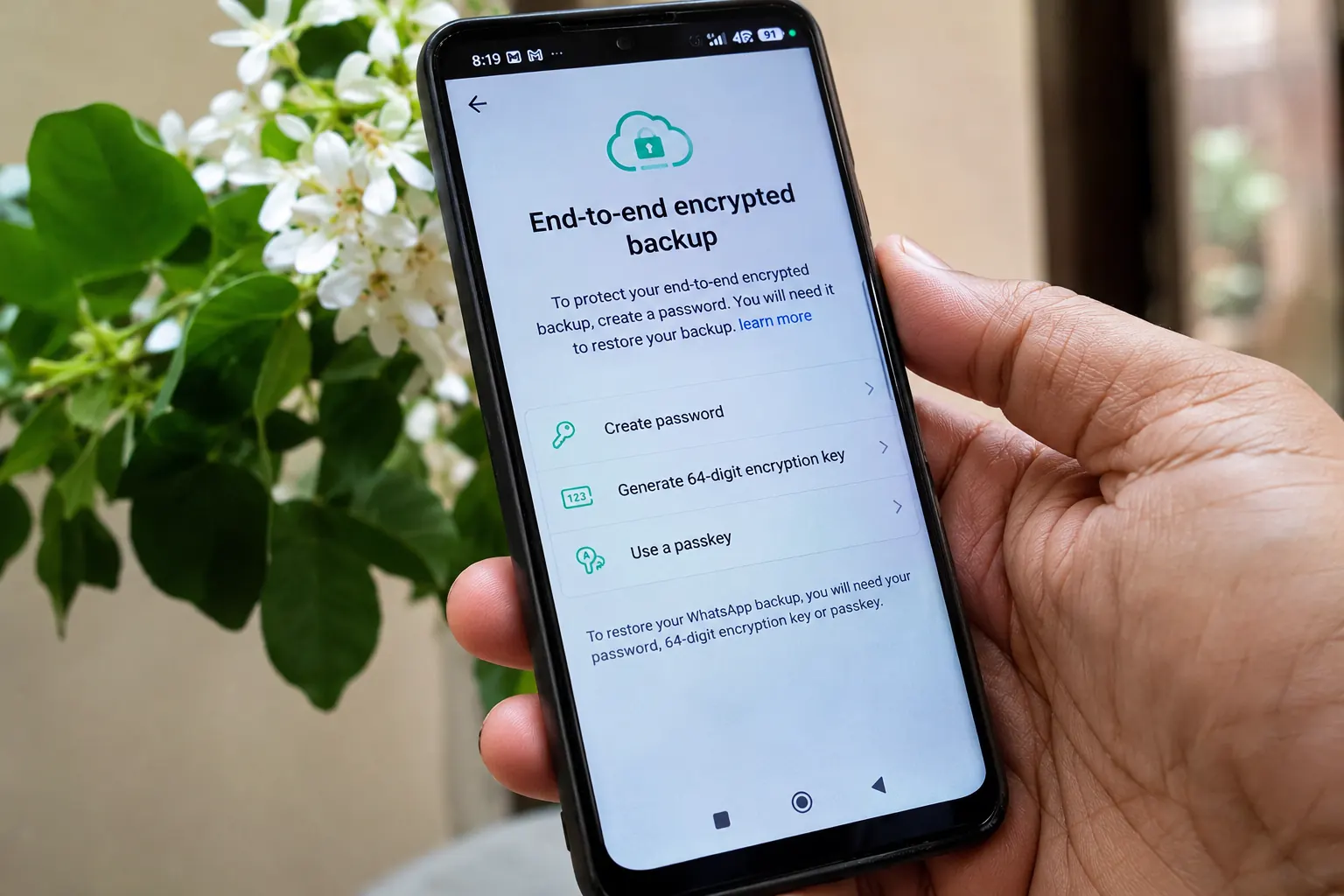
End to end encrypted backups add another layer around stored conversations. Access may need a password or a 64 digit encryption key depending on the setup. A supported passkey is a third option. These credentials aren’t interchangeable. Your usual Google or Apple Account password may not be what WhatsApp is asking for.
An old phone that still opens its chats might let you change the encrypted backup password in WhatsApp settings. Without access to the original chats and without the credential recovery may be impossible. WhatsApp states that it cannot reset a lost encrypted backup password. It cannot restore an inaccessible encrypted backup for you either. WhatsApp’s encrypted backup recovery guidance is worth reading before anything else.
Nobody offering recovery help online should ever receive your encryption key or backup password. The same goes for verification codes.
Chats missing after the restore
Sometimes the restore works and the result still disappoints. Recent conversations might be absent. Images from one chat might have gone missing.
Backup date comes first. A backup made several days before the switch can’t hold messages that arrived afterward. WhatsApp also warns that restoring an older or incomplete backup can leave out chats that weren’t in that saved copy. Other possibilities include excluded videos or incomplete media restoration. A corrupted backup could be behind it too.
Missing conversations that still sit on the old phone deserve protection while you look into supported transfer options. A new backup made from the incomplete restored history could overwrite an older one you still need.
When recovery isn’t possible
WhatsApp states that it can’t rebuild chat histories from its servers since it doesn’t store everyone’s message history for later restoration. A backup that was permanently deleted may be gone for good. The same goes for one that never completed or became irreparably corrupted. An encrypted backup lacking its required credentials is similarly inaccessible. WhatsApp’s official troubleshooting page says corrupted backups can stay unrestorable even after standard troubleshooting.
The original phone matters most at this stage. Protect it while you look into supported transfer or backup options before taking anything destructive. Apps claiming they can recover any conversation or bypass encrypted backups deserve suspicion since such promises may put your data and accounts at further risk.
Mistakes that make things worse
Acting before checking where the chats actually live causes most of the damage. Deleting a cloud backup to free space is especially risky because if it was your only recoverable copy there may be no way back. Factory resetting the previous phone before confirming the new one holds all your messages and media is another trap.
Creating new backups without checking the existing backup date is a quieter mistake since a newer backup can replace an older one with important conversations. Switching accounts repeatedly muddies which backup belongs to which number. An unverified recovery app brings privacy and security risks for no reason.
Setting things up so this doesn’t happen again
After your chats are safely restored open WhatsApp > Settings > Chats > Chat backup. The account selected for backups is shown there. So is the last successful backup date along with your preferred backup frequency. It also tells you whether videos are included and whether end to end encrypted backup is on. Make sure you can reach the encryption credential securely.
Phone and cloud storage deserve attention before any device change. A move to another operating system needs WhatsApp’s supported migration process checked beforehand. The old phone shouldn’t be wiped or sold until the new one shows the conversations and media you need.
Quick answers to common questions
Can I restore WhatsApp chats without a backup?
Chats still open on the old phone may qualify for a supported direct transfer. Without accessible original chats or a recoverable backup restoration generally isn’t possible.
Why can’t WhatsApp find my Google Drive backup?
The backup may belong to another Google Account or phone number. It may not have completed or may no longer exist. Confirm the original account and number before reinstalling anything.
Can I restore an Android WhatsApp backup on an iPhone?
The normal iPhone iCloud restore process can’t do it since the two platforms use different cloud systems. A supported cross platform migration method is required.
Can restoring a backup bring back deleted messages?
They return only if a valid backup being restored contains them. A backup created after deletion won’t necessarily include them.
Will reinstalling WhatsApp delete my chats?
Locally stored chats can be at risk when no usable backup or transfer source exists. Recovery options should be verified before uninstalling.
Why is WhatsApp restore stuck at 99%?
Media processing may be involved. Connectivity or storage limits could be too. The percentage alone diagnoses nothing.
Can I restore an encrypted backup without the password?
WhatsApp may be unable to recover it when the password or key is gone. The same applies to a passkey you can’t access once the original chats are out of reach.
How long does WhatsApp backup restoration take?
No single duration is guaranteed. Backup size and network speed shape it. Device performance and media processing do too.
Can I restore an older WhatsApp backup?
WhatsApp says Google Account and iCloud backups can be replaced by newer ones. An earlier version may be gone once overwritten.
Can WhatsApp Support recover my lost chats?
Support can offer troubleshooting guidance. WhatsApp says it cannot retrieve your personal chat history from its servers or recreate a deleted or corrupted backup.
Where this leaves you
Trying fixes at random puts valuable conversations at greater risk. The safer route starts with identifying the original backup. After that comes confirming the correct account and phone number and checking storage and connectivity along with whether encryption is involved.
An original phone that still contains your chats should stay protected until recovery or transfer succeeds. A restore problem doesn’t always mean your conversations are gone. Some backups really cannot be recovered though.
More practical troubleshooting and digital safety guides live in the Technology & AI section on Sponsored Post Hub.



Comments
0 discussionsAdd your perspective, reply to other readers, and keep the conversation useful.
Conversation
Reader responses